
How to Know Installer Changes : Essential Studio v34.1.29?
With the release of 2026 Volume 2 (34.1.29), Syncfusion has introduced a new set of Standalone UI SDKs and updated editions of Essential Studio, giving developers greater flexibility to choose only the UI capabilities their applications require.
| New edition or SDK | Description |
|---|---|
| Grid SDK | For building data-driven business applications with advanced data grid capabilities. |
| Chart SDK | Ideal for dashboards and analytics applications requiring rich data visualization. |
| File Manager SDK | Designed for file management systems with robust file handling and organization features. |
| Scheduler SDK | Best for calendar and booking applications, offering powerful scheduling components. |
| Diagram SDK | For workflow automation and diagramming tools, enabling interactive diagram creation and editing. |
| Gantt SDK | Tailored for project planning applications with Gantt chart and project management features. |
| Rich Text Editor SDK | Perfect for content authoring applications that need advanced text editing capabilities. |
| UI Component Suite | The complete set of UI controls across all major frameworks, suitable for applications requiring multiple UI capabilities. |
Installer changes
From 34.1.29 onwards
In addition to the existing UI Components Suite, Syncfusion now offers Standalone UI SDKs, allowing you to install only the specific UI component your application requires. The complete UI Components Suite continues to remain available for projects that need the full set of controls.
Major changes
- New Standalone UI SDKs introduced: Grid, Chart, Scheduler, Gantt, Rich Text Editor, Diagram, and File Manager controls are now available as individual installers, in addition to being part of the full UI Components Suite.
- Complement to the UI Components Suite: The UI Components Suite is not replaced — the Standalone UI SDKs sit alongside it, giving teams a lighter footprint option for projects that only need a single component.
- Existing platform installers unchanged: The platform-based installers (Web, Mobile, Desktop) and the previously introduced Document solutions (Document SDK, PDF Viewer SDK, DOCX Editor SDK, Spreadsheet SDK) continue to be available as before.
Retaining Value for Existing Customers
No Change for Existing Syncfusion Customers
With the introduction of Standalone UI SDKs in the 2026 Volume 2 release, Syncfusion continues its commitment to existing customers. If you already have an active Syncfusion subscription, your current product access and entitlements remain unchanged. You will continue to receive all products, updates, and support included with your existing license—there is no change to your experience or benefits.
Impact on Installers and Product Access
Existing Customers:
- If you purchased your license prior to the introduction of Standalone UI SDKs, or if you have an active subscription, you will continue to have access to all UI components, document processing libraries (PDF, DocIO, XlsIO, PowerPoint, and converters), and viewers/editors (PDF Viewer, DOCX Editor, Spreadsheet Editor) as before based on previously purchased edition.
- The offline Windows installer will continue to provide the complete set of products included with your subscription or licensed edition, based on your login credentials or unlock keys.
New Customers:
- New customers can choose to license the full UI Component Suite or select individual Standalone UI SDKs based on their project requirements.
- If your application is focused on a specific area such as data management, business dashboards, scheduling and resource planning, file management, workflow and process design, project tracking, or content editing, you can choose the SDK that best aligns with your specific needs.
- Customers can also purchase document solutions, including Document SDK, PDF Viewer SDK, DOCX Editor SDK, and Spreadsheet Editor SDK, based on their specific requirements.
Note:
Existing Syncfusion customers are not affected by these changes. Current product entitlements remain unchanged, and you will continue to receive all products included with your subscription.
Web Installer
From 34.x.x (34.1.29 and higher)
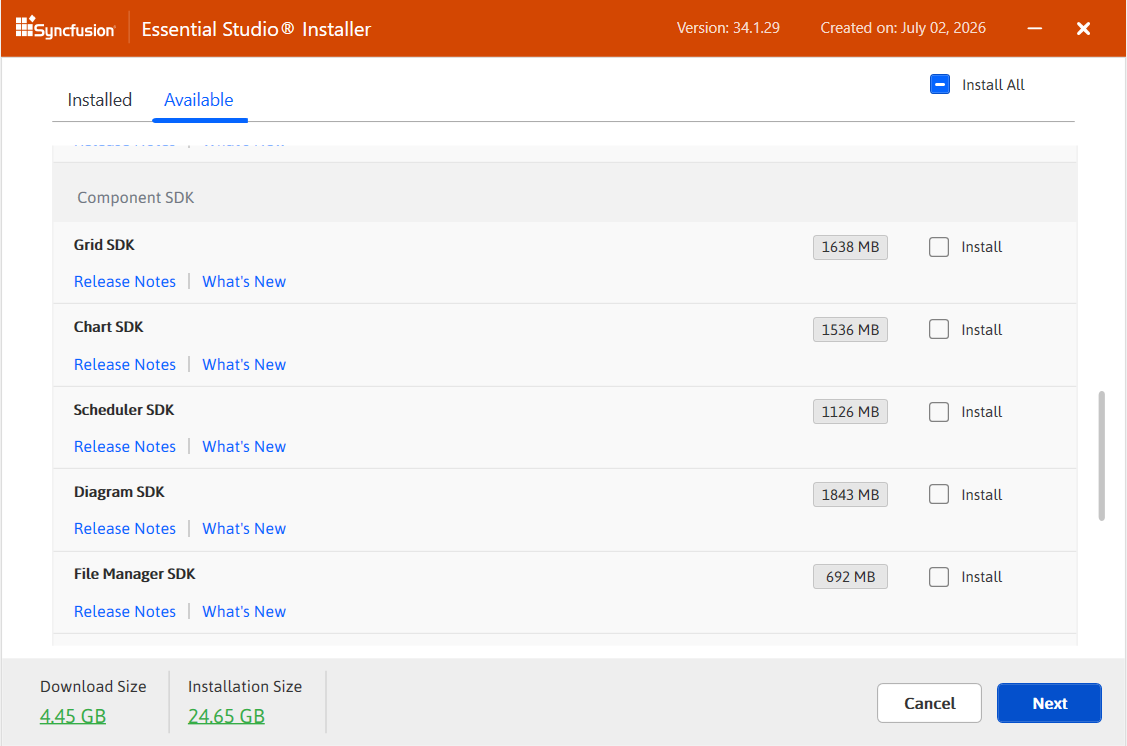
- The web installer now also supports the new standalone UI SDKs.
- After login, the installer displays all available products, including the new standalone UI SDKs, allowing you to select any combination for installation.
- You can select any combination of these SDKs and other licensed products for installation.
- The installer ensures you only see and install products relevant to your license.
Trial Users
- If you don’t have an existing account, you can create one during installation.
- Once logged in, trial users will see all available platforms, frameworks, and standalone UI SDKs with a trial license, allowing you to explore the full product set before purchase.
Frequently asked questions
Are existing Syncfusion customers affected?
No. Existing customers are not affected. Current product entitlements remain unchanged, and customers will continue to receive the products included with their existing subscription.
Can multiple SDKs be used together?
Yes. You can combine multiple SDKs depending on your application architecture. For example, an enterprise application may use the Grid SDK for data management, the Chart SDK for dashboards, and the File Manager SDK for file operations.
How do I decide between a Standalone UI SDK and the UI Component Suite?
Choose a Standalone UI SDK when your application focuses on one specific UI capability. Choose the UI Component Suite when your application requires a broader collection of components across multiple functional areas.
Is the UI Component Suite still available?
Yes. The UI Component Suite continues to be available and remains the recommended choice for applications that require a broad collection of enterprise-ready UI components.
